New leads can lose momentum when follow-up tasks are created manually or tracked across disconnected tools.
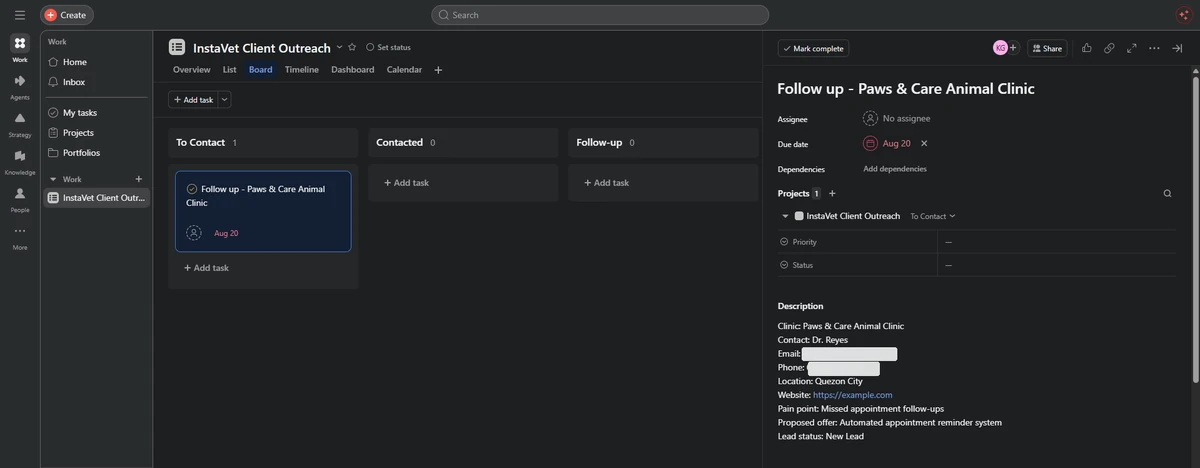
This workflow detects a new spreadsheet entry, maps the relevant lead information, and creates a structured Asana follow-up task with an assigned due date.
Operational problem
New leads remaining inactive in spreadsheets
Manual task creation
Inconsistent follow-up scheduling
Contact and pain-point details being copied by hand
System built
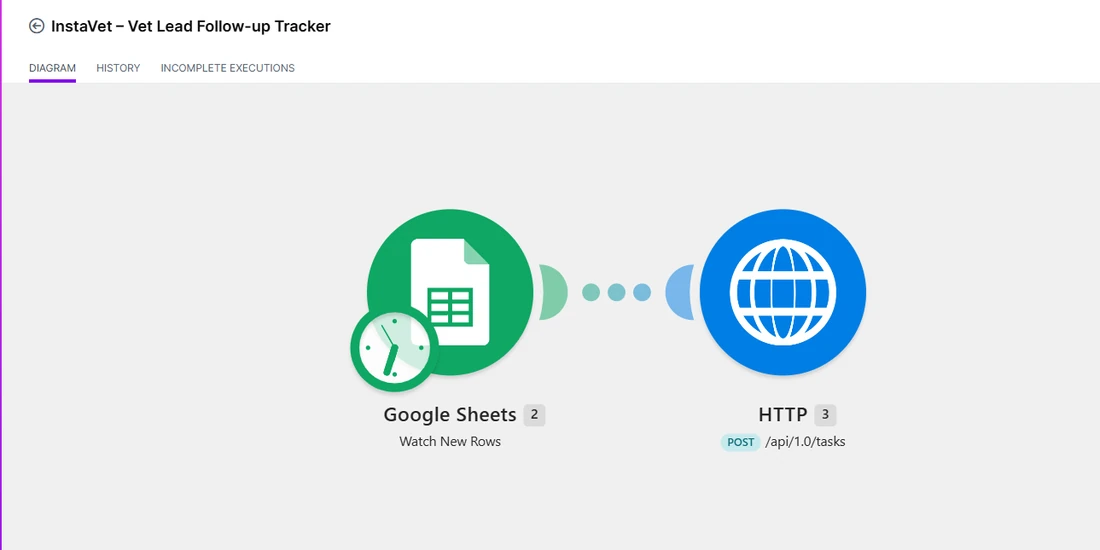
The verified current flow is Google Sheets to Make.com to HTTP POST to Asana task creation. It does not yet write the returned Asana Task ID or automation status back to the sheet.
Workflow diagram
01New Lead Added to Google Sheets
02Make.com Detects the New Row
03Lead Information Mapped
04HTTP POST Request Sent to Asana
05Follow-Up Task Created
06Due Date and Lead Details Added
Tools and technical capabilities
Watching new spreadsheet records
Mapping structured lead information
Sending an authenticated HTTP request
Creating tasks through the Asana API
Assigning a calculated follow-up date
Transferring data between business platforms
Actual project evidence
Structured Lead SourceOrganizes contact details, business information, pain points, proposed offers, and lead status in Google Sheets.Automated Task HandoffDetects each new spreadsheet row and sends mapped lead information to Asana through an API request.Scheduled Follow-Up TaskCreates an organized Asana task with lead details, status, and follow-up date.
Current limitation
This workflow currently creates the Asana task but does not yet write the Asana Task ID or Automation Status back to Google Sheets.
Key learning or next improvement
The recommended upgrade is to add a Google Sheets Update a Row module after the HTTP Create Asana Task step, then write the returned task GID and automation status back to the original lead record.
Have a similar workflow bottleneck?
I can help map the repetitive steps and identify where practical automation could make the process easier.